
-
How to Install Your Own Custom Apps on a Kindle Fire
Well, folks, I have my Kindle Fire in hand. So far, I think it is more than worth its $200 price tag. I’ll be posting more about it later tonight after I’ve had more time to take it for a spin.
One of the first things I wanted to know was could I load my upcoming web app on it to test (which I have discovered is called “side loading”). I tried connecting the Fire via USB to my computer and copying the APK that way, but that doesn’t work.
Not to be deterred, I did the following:
- I went into the Kindle settings by tapping the cog in the upper right hand corner of the screen, then tapped More > Device > and turned “on” the Allow Installation of Applications from Unknown Sources”
- I uploaded the APK to an accessible folder on my website.
- Then, I went to that folder in the Silk Browser.
- Once the download was complete, I went to the download manager by clicking on the orange Kindle label in the top left hand corner of the screen.
- I then tapped on the name of the APK and it asked me if I wanted to install the app.
- I told it yes, at which point the app was installed (and is working quite nicely).
That was easy and now I can test my own app on my own device. I’m a happy early adopter!
-
Android App Web Color Prototyper Sneak Peak
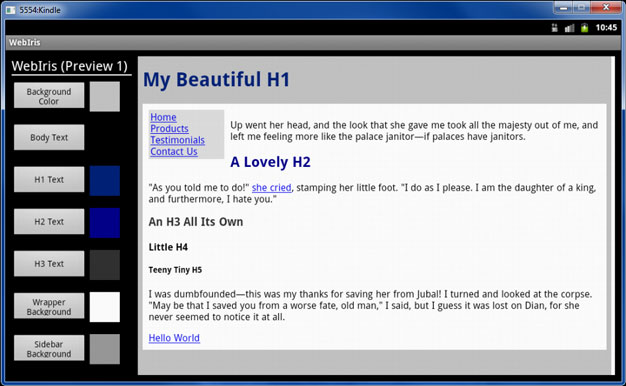
A couple weeks ago, I alluded to an Android app I’m writing in conjunction with Mike Bryant. As requested by some friends wanting to know what the app does, it is meant to help web designers prototype color schemes quickly. You set colors for various parts of a sample page and get to see an instant preview of what the colors will look like. When you’re done, the app will email you the sample page (and more importantly) the CSS that creates the previewed color scheme.
Here’s a screenshot of the app in progress (codenamed WebIris) running on an Android 2.3 tablet emulator (which not-so-coincidentally is setup in a Kindle Fire configuration).
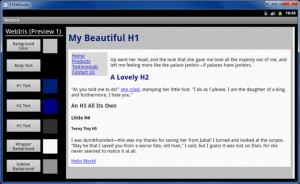 (Click for a larger view)
Remember, this is an early preview. Not all the bells and whistles are represented in this preview ;) We are targeting the app for Android 2.3 devices and beyond. Stay tuned!
-
Kindle Fire Uses Android 2.3 (API Level 10) Gingerbread as its SDK
I preordered a Kindle Fire a couple days after it was announced. At $200, I figure I couldn’t go wrong. Besides, Amazon has impressed me greatly with my e-ink Kindle: I’m sold on their ability to please.
One of the things that most excites me about getting a fire is that I can start developing an Android application. Sure, I could have been developing in an emulated environment, but I want to have a physical tablet to actually test my app on. The affordability of the Fire was the opportunity I’ve been waiting for.
Oddly, Amazon waited a bit before providing developers any details on the Fire’s development target. Earlier this month, they finally spilled the beans: The Fire is built on Android 2.3 Gingerbread (API Level 10). Since the Fire has stripped-down hardware, the use of the older API makes perfect sense. For the app I’m building, 2.3 provides more than enough functionality. If all goes well, I should be able to release my little app (more on that later) in a couple weeks.
-
An easy fix for iTunes 10.5 (x64) that won’t install on Windows 7 64 bit
I just downloaded iTunes 10.5 and tried to install it on my Windows 7 64 bit machine. What I got was an error message that said:
There is a problem with this WIndows Installer package. A program required for this install to complete could not be run. Contact your support personnel or package vendor.
The fix that allowed 10.5 to install correctly was very simple. Simply go to Control Panel > Uninstall a Program. Right-click on “Apple Software Update” and choose “Repair.” After that, iTunes 10.5 (x64) should install with no problems at all. Apparently the Apple Updater can get messed up and cause the new version not to install. Imagine that.
If only all Windows errors were so easy to fix!
Categories
- Adobe (1)
- Illustrator (1)
- Android (6)
- Apple (4)
- iPhone (1)
- Cell Phone Tricks (1)
- DSLR/Camera (1)
- Gadgets (3)
- Games (1)
- Google (2)
- Helpful Stuff for Teachers (1)
- Intro to Computer Programming (1)
- Kindle Fire (5)
- Linux (3)
- Microsoft Office (1)
- Excel (1)
- Microsoft Windows (33)
- Windows 10 (5)
- Windows 11 (8)
- Windows 8 (2)
- Windows Technical Preview (1)
- Mike Bryant for State Representative (5)
- OS X (7)
- Personal Failure (1)
- Personal Updates (241)
- Physical Fitness Challenge (2)
- Political Commentary (6)
- Raspberry Pi (1)
- RaspBMC (1)
- Recommended Products and Vendors (4)
- Social Commentary (5)
- Sustainability in Eastern Kentucky (2)
- Tech Tips (73)
- Getting Nerdy (1)
- Windows 10 (3)
- Windows 11 (6)
- Web Development/Programming (14)
- Visual Basic (1)
Archives